Verifying records
Understand how Yolog keeps signed entries permanent and how anyone can confirm a record wasn't changed.
A paper logbook is trusted because pages are hard to change without it showing. Yolog does the same job with math. Once a mechanic signs an entry, it’s locked: nobody can edit or delete it, not the owner, not the mechanic, and not Yolog’s own staff through the app. If something was wrong, the fix is a new correction entry that a mechanic signs, and the original stays exactly as it was. See Fixing mistakes.
This guide explains, in plain terms, how that works and how a buyer, inspector or insurer can check it.
The hash chain, simply
When an entry is signed, Yolog calculates a fingerprint for it, called a hash. It’s a 64-character code made with SHA-256, a standard method used across banking and software. Change a single letter in the entry and the fingerprint comes out completely different.
Each entry’s fingerprint is made from four things together:
- The fingerprint of the entry signed just before it in the same logbook.
- The entry itself: type, description, work date, times and any attachments.
- The moment it was signed.
- The mechanic’s certificate number.
Because every fingerprint includes the one before it, the entries form a chain. Altering an old entry would change its fingerprint, which would no longer match what the next entry recorded, and so on all the way to the newest entry. Each logbook (airframe, engine, propeller) has its own chain. Entries brought in from your paper logbooks join the chain too, marked as imported from scan, so they’re protected from change from the day they’re applied. The newest entry’s fingerprint is called the head hash, and its position is the chain head.
The signing seal
On top of the fingerprint, Yolog adds a seal: a second code (chain_hmac) made with a secret key that only Yolog’s servers hold. The record also notes which key made the seal (the key id, such as v1). The seal shows the entry was signed through Yolog. It isn’t needed to check that the chain links together, and outsiders can’t check it themselves because they don’t have the key.
From time to time a signing key may be replaced with a new one. Old entries are never re-signed when that happens. Each one keeps the seal and key id it was signed with, and stays valid under that key.
Yolog also rechecks chains on its own schedule and keeps a separate record of each chain’s latest head outside the main database, so entries quietly cut off the end of a chain would be noticed.
Where to see it
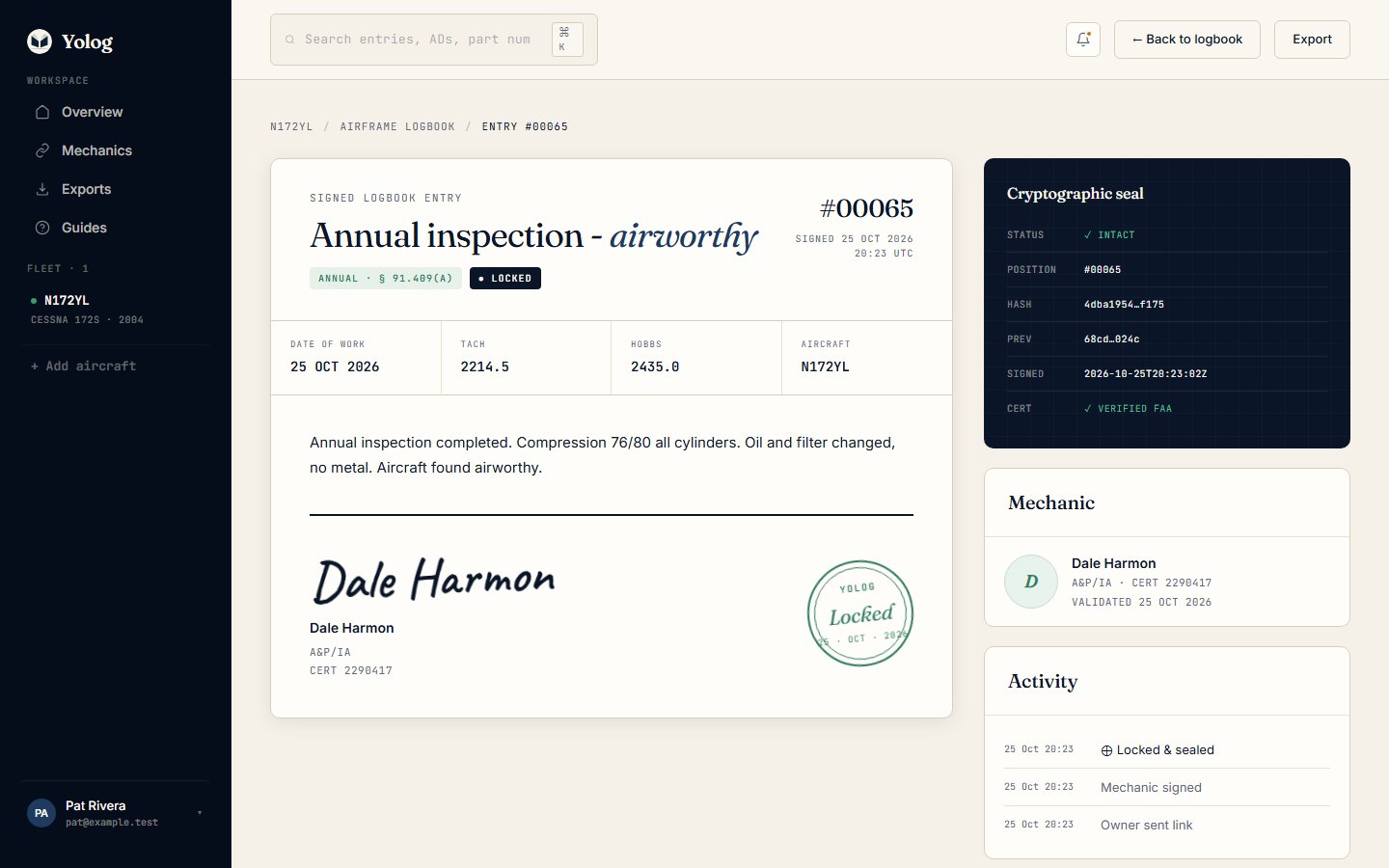
Open any signed entry. The Cryptographic seal panel shows its position in the chain, the start and end of its hash (Hash), the previous entry’s hash (Prev), when it was signed, and whether the mechanic’s certificate was checked against the FAA Airmen Registry (Cert). VERIFIED FAA means the certificate matched; other labels, like NAME MATCH or NO MATCH, mean the check couldn’t fully confirm it, and the entry page explains why.
What a buyer or inspector sees
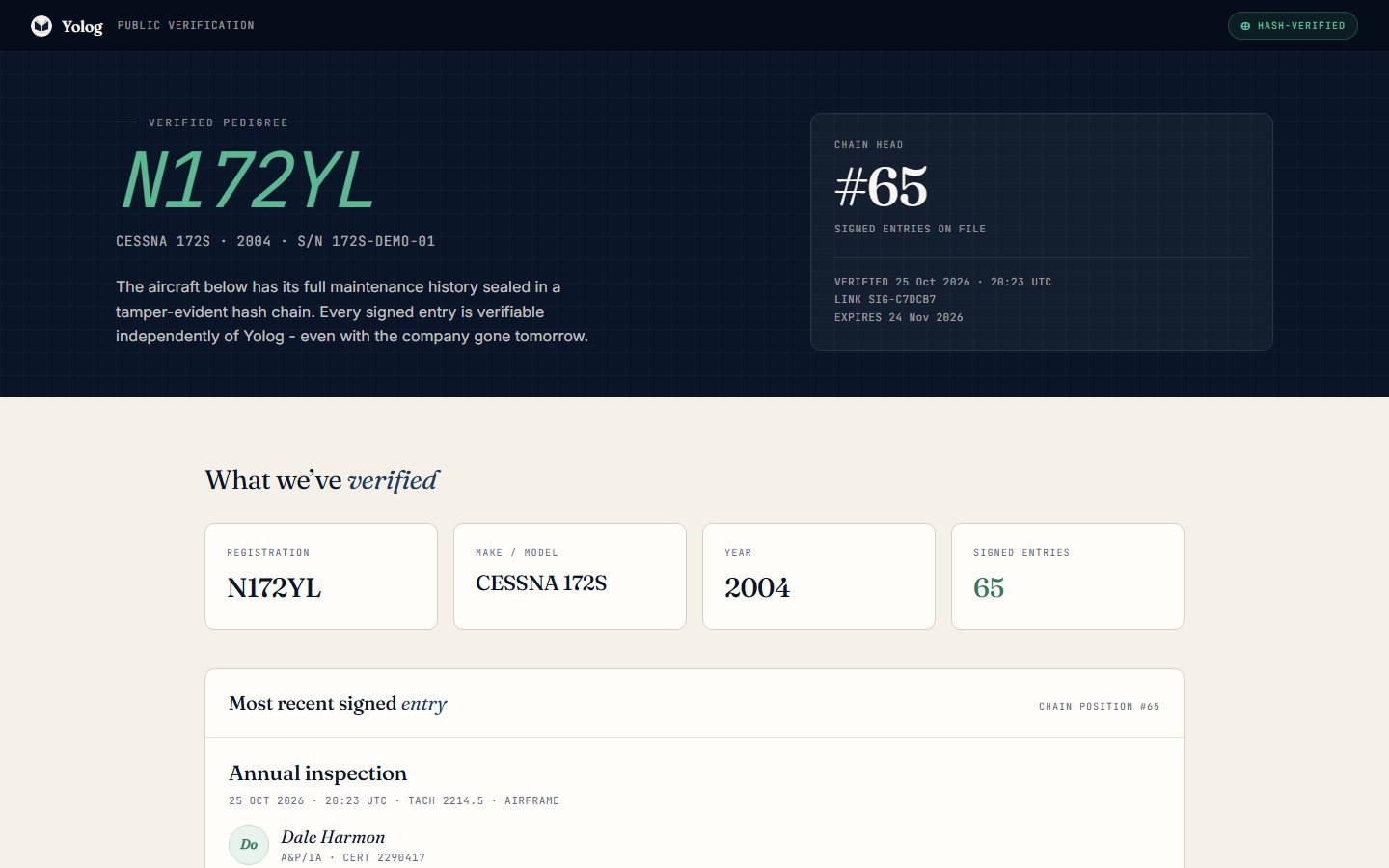
An owner or co-owner can send a public verification link (see Exports and sharing). Opening it needs no account. The page shows:
- The registration, make, model, year and serial number.
- The chain head and the number of signed entries.
- The most recent signed entry: its type, when it was signed, the logbook, and the mechanic’s name, certificate type and number.
- When the link expires.
It doesn’t show the full logbook or the owner’s contact details. For the complete record, ask the owner for the PDF pedigree or a read-only share link.
Checking an export yourself
This part is for technical readers. You’ll need the owner’s CSV export, or the PDF.
- In the CSV, sort the rows by
logbook_kind, thenchain_position. - The first entry in each logbook has a
previous_hashof 64 zeros. - Every later row’s
previous_hashshould equal theentry_hashof the row before it. - The last row’s
entry_hashshould equal the Head hash on that logbook’s Chain proof page in the PDF.
If every link holds, no entry has been removed, reordered or swapped out since the export was made. For reference, each entry_hash is the SHA-256 of the previous hash, the entry’s content as JSON, the signed-at time and the certificate number, joined with |. The export shows each entry’s fields in readable form, not the exact bytes that were hashed, so recalculating a single entry’s hash from scratch takes more than the export alone.
Electronic records and signatures
Yolog’s signing process was built with FAA Advisory Circular AC 120-78B in mind. That AC is guidance on electronic signatures and electronic recordkeeping systems, not a regulation. When mechanics sign, they type their name, give their certificate details, and tick three statements before choosing Sign & lock entry: that the work was done in accordance with current FAA regulations and the aircraft is approved for return to service with respect to it, that the entry becomes permanent, and that Yolog may timestamp and store it with their certificate number visible to the owner and authorized parties. Entries are written to carry the content 14 CFR 43.9 and 43.11 call for.
Whether an electronic record is acceptable in a given situation is up to the FAA and the people relying on it. Yolog doesn’t certify compliance for you, and the owner remains responsible for the aircraft’s records under 14 CFR 91.417.
Still stuck? Contact us - a real person reads every message.